

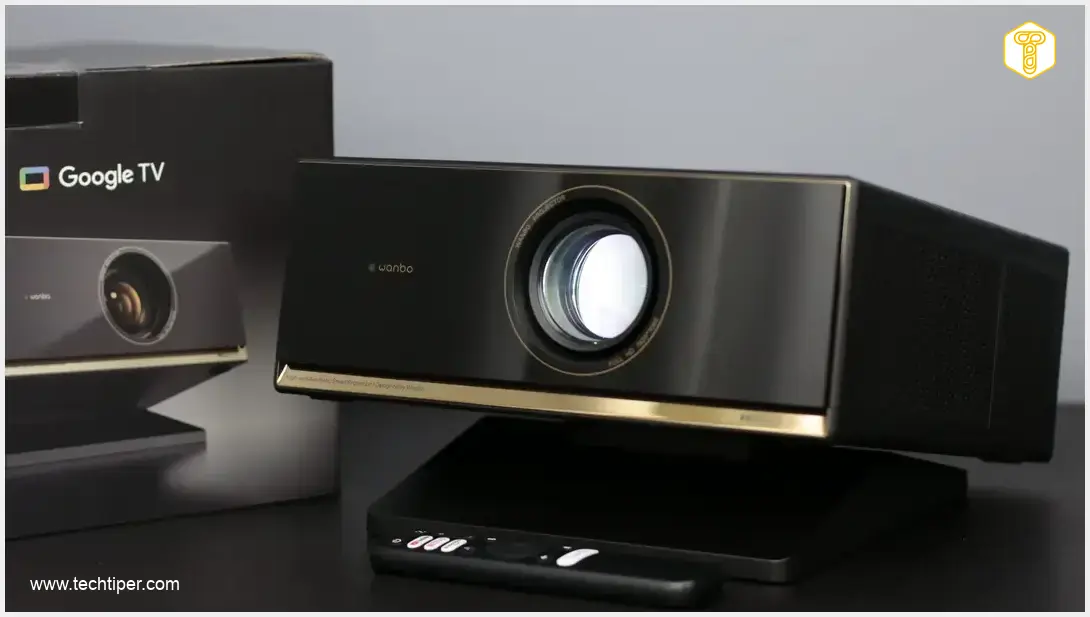
Wanbo X7 Pro Max Review
-
Value & Affordability
-
Design & Build Quality
-
User Experience (Google TV)
-
Image Quality
-
Sound Quality & Noise
-
Connectivity & Features
The Projector That’s a Great Starting Point for a Home Cinema
The Wanbo X7 Pro Max offers an impressive balance of performance and affordability, making it an excellent entry point into home cinema. With a streamlined Google TV experience, commendable image quality, and thoughtful design, it delivers significant value for its price. Minor quirks like the glossy finish and occasional auto-correction hiccups are easily overlooked given its overall capabilities.
Advantages
- Excellent value for money
- Efficient and streamlined Google TV (Android 14) OS
- Supports all popular streaming services (Netflix, Disney+, HBO Max)
- Good practical brightness for various viewing conditions
- Relatively quiet operation
- High-quality build and elegant design
- Accessible filters for easy maintenance
- Suitable for casual gaming (low input lag)
- Comprehensive connectivity (HDMI 2.1 eARC, Wi-Fi 5GHz, Bluetooth 5.0)
Disadvantages
- Glossy front panel prone to dust and fingerprints
- Built-in speakers lack true stereo separation
- Automatic image correction occasionally requires manual adjustment
- Remote control batteries and HDMI cable not included
- Default color calibration might need minor tweaking
Contents
Wanbo X7 Pro Max Review: The Projector That’s a Great Starting Point for a Home Cinema
The Wanbo X7 Pro Max projector has arrived for a comprehensive review. Positioned as Wanbo’s premium offering, it promises top-tier performance without the premium price tag, making its affordability a significant selling point. This competitive pricing doesn’t stem from cutting corners; rather, Wanbo has adopted a thoughtful and refined approach to its design and features. Join us as we delve into the specifics of this intriguing device.
Unboxing, Technical Specifications, and Pricing
The projector arrives in a rather large, rectangular box that immediately guides you through the initial setup process. Inside, you’ll find essential paperwork, a power cable, the remote control, and an additional, movable stand with screws. It’s worth noting that batteries for the remote are not included, and some users might also expect an HDMI cable to be part of the package.
The Wanbo X7 Pro Max is priced at approximately $450 (or equivalent in local currency), placing it firmly in the category of reasonably priced projectors. Considering its smart functionalities, it’s a versatile proposition, though it naturally requires a constant power supply.
Looking at its technical specifications, there’s very little to fault. While the market offers projectors with brighter lamps (often without Smart TV features) or higher resolutions (but lower brightness), the Wanbo X7 Pro Max strikes an impressive balance, aiming to be a true “golden mean” in its class.
- Lamp Type: LCD, 1500 lumens brightness, 3500:1 contrast, 30,000 hours lifespan
- Projected Image: Full HD (1080p, 16:9, supports 4K sources), HDR10, MEMC, 40-300 inches (recommended: 100-180 inches)
- Projection Distance: 1 – 7.6 m (throw ratio: 1.15, recommended up to 4.6 m)
- Connectivity: Wi-Fi 5 GHz, Bluetooth 5.0
- Ports: HDMI 2.1 (CEC, eARC), 3.5 mm audio jack, USB-A (2.0)
- Other Features: Automatic image adjustment (keystone correction, brightness, focus, obstacle avoidance), MT9660 processor, 2x 10 W stereo speakers (Dolby Audio), 2 GB RAM, 32 GB internal storage
- Operating System: Google TV (Android 14)
- Dimensions: 284×284×151 mm (approx. 11.2 x 11.2 x 5.9 inches)
- Weight: 4.1 kg (approx. 9 lbs)
Design and Build Quality
Wanbo consistently prioritizes a simple yet elegant design for its home projectors. Both the previously reviewed X5 Pro and the current subject, the X7 Pro Max, share a nearly identical aesthetic. You’ll need to scrutinize the details to tell them apart.
Generally, the device is constructed from high-quality, well-fitted plastics. The front of the projector features the brand logo alongside image correction sensors. The lens itself is mechanical and electrically adjustable. The glossy piano black finish, while elegant, is prone to collecting dust and fingerprints, which users should be mindful of.
The sides of the Wanbo X7 Pro Max are matte. The left and right sides conceal removable panels with filters, simplifying the cleaning process to prevent overheating and ensure the quietest possible operation. The rear houses all the connectivity ports, a power indicator light, and the sole physical button (power switch). This design means all control is exclusively managed via the remote control.

The top surface of the projector remains clean and uncluttered, but the bottom reveals more activity. In addition to the traditional rubber feet and mandatory markings, there are mounting points for the included auxiliary stand. This stand allows for smooth angle adjustment of the Wanbo X7 Pro Max by +/- 15 degrees, a feature that is often invaluable for quick screen setup.
The Intuitive Remote Control
The primary accessory for operating the Wanbo X7 Pro Max is a classic, straightforward remote control. It’s made of acceptable quality plastic, which is well-assembled. The rubber buttons offer good tactile feedback and a satisfying click. Crucially, it’s a Bluetooth remote with a built-in microphone for voice commands, yet the manufacturer has also retained infrared (IR) support for broader compatibility.
User Experience and Performance
After inserting batteries into the remote, connecting the projector to power, and turning it on, users are greeted by Google TV. It’s worth noting that Wanbo has made a commendable effort in localizing the entire system, particularly its custom additions. The initial setup process is identical to that of TVs running the same platform, requiring only a smartphone, and everything is ready within minutes. Most of this time is spent downloading and configuring streaming applications.
Unlike the recently reviewed Wanbo X5 Pro, the X7 Pro Max no longer distinguishes between two separate operating systems (an internal one and Google TV). With the X7 Pro Max, everything is managed directly from Google’s platform, offering a more streamlined and convenient experience. Users can manage both multimedia content and projector settings from a single interface, which is particularly useful given the extensive customization options available for sound and image.
The platform’s performance is commendable. Everything operates as expected, with no noticeable delays in command execution. While some applications might load marginally slower at times, the overall impression is one of fluidity and stability, with no freezing or crashes. Furthermore, all popular streaming services, including Netflix, Disney+, and HBO Max, are supported. The system also correctly decodes HDR10 content, which we’ll discuss further in the image quality section.
Sound Quality
Wanbo highlights the stereo speakers in the X7 Pro Max, each rated at 10W, complemented by Dolby Audio support. On paper, this sounds promising. In practice, the performance is good, but with a minor caveat. The speaker arrangement doesn’t fully deliver a true stereo effect, as the left and right channels are reproduced almost identically. After conducting several tests, the sound profile leaned closer to mono. When audio is played through the left channel, the sound is still transferred to the right, albeit slightly attenuated. This might be an area for future software updates.
Nonetheless, one shouldn’t expect an exceptional spatial audio experience from a pair of built-in speakers. If this expectation is managed, the sound quality of the Wanbo X7 Pro Max is genuinely appreciated. There’s largely no need to connect external speakers, as the soundstage is quite broad and includes noticeable bass. Most casual movie-watchers will be satisfied, and for those desiring more, the HDMI 2.1 port with eARC support allows for external audio systems. You can read more about other exciting gadgets in our article about technology gadgets that sound like a joke but are real.
Crucially, the projector operates relatively quietly. Wanbo has thoughtfully addressed this by including accessible filter cleaning windows and a software-based quick-purge option. While the fan noise is audible, it’s a consistent, gentle hum that quickly fades into the background once a movie or show begins. As an added bonus, the projector can also function as a standalone Bluetooth speaker.
Image Quality
Moving on to image quality, another area where the Wanbo X7 Pro Max performs commendably, though not without minor issues. The automatic image correction features, while generally effective, are the primary concern here. The manufacturer has implemented numerous algorithms designed to adapt the projection area to the screen (including obstacle avoidance), and they usually work well. However, occasionally, the projector would incorrectly apply a keystone effect in simple setups, requiring manual adjustment. You might find similar user-centric improvements in devices like the Realme 16 Pro Plus 5G, especially in their user interface.
The default color calibration is satisfactory when the “Cinema” mode is selected. My only recommendation would be to slightly temper the blue tones, which can sometimes be overly prominent, subtly affecting red hues, among others. Fortunately, the software allows for straightforward adjustments, which advanced users will appreciate.
Another strong point is brightness. While the advertised 1500 lumens might be achieved with very small screen sizes and boosted modes, in practical terms, expect around 500 lumens in “Movie” mode on a 120-inch screen. For an 80-inch display, this figure approaches 750 lumens. This output is entirely sufficient for evening movie or series viewing. Moreover, even during the day, with blinds or curtains drawn, the image remains perfectly watchable.
The aspect ratio is also noteworthy, as it allows for a large projection area in a typical home environment, even with a relatively short projection distance.
Is the Wanbo X7 Pro Max suitable for gaming? Surprisingly, it performs quite well, with an input lag of approximately 35 ms (when image enhancements are disabled). This makes it perfectly acceptable for occasional, casual gaming sessions on a weekend evening.
Conclusion and Our Verdict
Our review of the Wanbo X7 Pro Max concludes with a positive assessment of this highly capable projector. It excels in home entertainment scenarios where watching movies and series on a large screen isn’t necessarily an everyday occurrence but an enjoyable occasional treat. It delivers impressive image and sound parameters, its operating system is efficient and supports all crucial standards, and all of this comes at a reasonable price point.
If we were to nitpick, a different finish for the front panel might enhance practicality, reducing issues with dust and fingerprints. Furthermore, don’t expect immersive surround sound from the built-in speakers. Similarly, occasional manual adjustments to the automatic image settings might be necessary. However, these are minor details that users can easily adapt to, and they don’t detract significantly from the overall excellent value proposition of the Wanbo X7 Pro Max.
Frequently Asked Questions (FAQ)
While advertised at 1500 lumens, practical usage yields approximately 500 lumens on a 120-inch screen in “Movie” mode, and closer to 750 lumens on an 80-inch screen. This is ample for evening viewing and even daytime viewing with curtains drawn.
Yes, running on Google TV (Android 14), the projector supports all major streaming platforms like Netflix, Disney+, and HBO Max, along with correct decoding of HDR10 content.
The automatic image adjustment algorithms (keystone correction, focus, obstacle avoidance) generally work well. However, occasionally, the projector might incorrectly apply a keystone effect, requiring manual fine-tuning by the user.
The projector is suitable for casual gaming, with an input lag of approximately 35 ms when image enhancements are disabled. This makes it a decent option for occasional gaming sessions.
Source: Developed internally. Opening photo: Lukasz Pajak
About Post Author
