

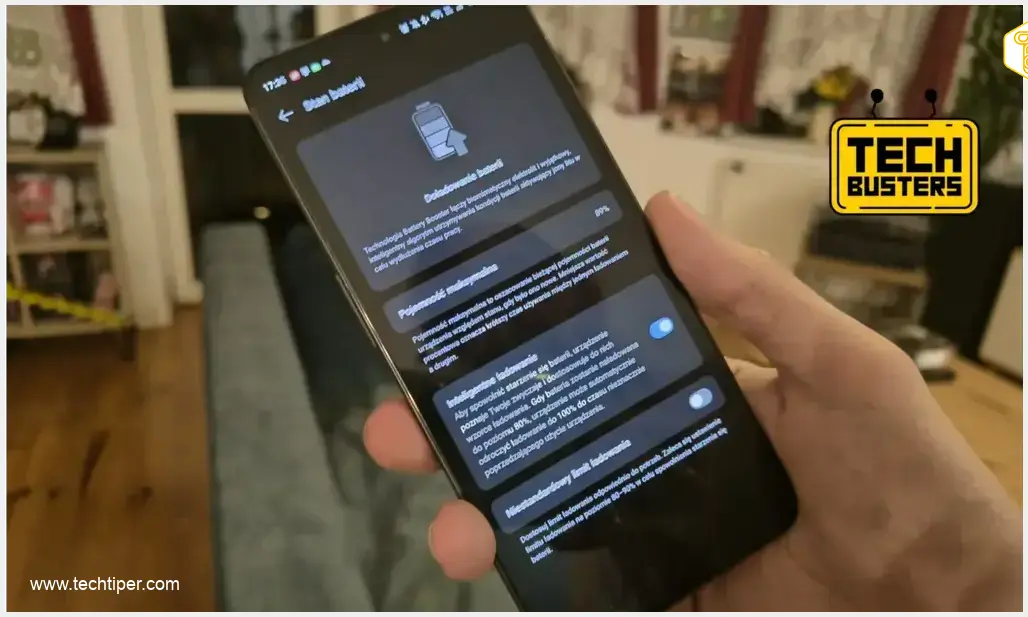
As smartphones are used continuously, their batteries gradually lose their maximum charging capacity. The Android operating system is designed to inform users about the current maximum battery capacity compared to its initial state. However, a crucial question arises: how accurately does it report this information? We put it to the test.
Contents
Uncovering Real Battery Health: Android vs. AccuBattery
The AccuBattery Test
To assess the true health of a smartphone battery, we utilized the popular application, AccuBattery. This app offers a suite of features, including the ability to measure charging voltage and current. By analyzing these metrics, AccuBattery can provide a more accurate estimate of a device’s actual battery capacity.
Our Testing Methodology
For our experiment, we selected a OnePlus 11 5G smartphone. We installed AccuBattery and ensured that the “dual-cell battery” mode was activated within the application. This setting is crucial for devices with split battery designs, allowing AccuBattery to provide an accurate measurement tailored to the phone’s specific hardware configuration.
Surprising Results
The results were startling. While the OnePlus 11 5G originally came with a 5000 mAh battery, AccuBattery reported an effective capacity of only 1900.3 mAh. This figure stands in stark contrast to the 89% battery health that the phone’s operating system indicated. The discrepancy highlights a significant gap between reported and actual battery health.
Considering the Context
It’s important to note that the OnePlus 11 5G model debuted in January 2023. While relatively new, such a drastic reduction in capacity could suggest either a highly aggressive degradation pattern or potential battery damage. This scenario could explain why a device might experience faster-than-expected battery drain, leading to user frustration.
Maximizing Your Smartphone’s Battery Lifespan
Even the largest smartphone battery will offer little benefit if not properly maintained. By adopting a few simple habits, you can significantly extend the healthy lifespan of your phone’s battery. Here are some essential tips to keep in mind:
- Utilize Automatic Battery Protection: Many modern smartphones offer a feature that stops charging at around 80% to prolong battery health. This prevents the battery from continuously trickle charging at higher percentages, which can cause strain. For more detailed insights, you might want to read about Android 17’s priority charging feature.
- Optimal Charging Window: Aim to plug in your charger when the battery level drops to around 20% and disconnect it before it reaches 100%. Maintaining the battery within the 20-80% range is generally considered best practice for longevity.
- Disable Always-On Display (AOD): While convenient, the Always-On Display feature constantly uses a portion of your screen, leading to noticeable battery drain. Disabling it can significantly improve battery life.
- Manage Background Apps: Regularly check and close applications running in the background that you are not actively using. These apps can consume resources and battery power without your knowledge.
- Uninstall Unused Apps: Periodically review your installed applications and uninstall any programs you no longer use. This not only frees up storage but also prevents potential background processes from draining your battery.
- Avoid Overheating During Charging: Never charge your smartphone in environments where it can overheat, such as under a pillow or in direct sunlight. High temperatures are detrimental to battery health and can accelerate degradation.
Beyond Battery Life: Debunking Tech Myths
At TechBusters, we’re dedicated to investigating and clarifying common tech misconceptions. Here are a few other myths we’ve explored:
- Can a smartphone function as a metal detector?
- Does a specific Windows 11 setting impact gaming frame rates?
- Is wireless charging genuinely more expensive than wired?
- Is it possible to register two different fingerprints on a single phone simultaneously?
- Does putting a laptop in the refrigerator actually boost FPS in games?
Frequently Asked Questions (FAQ)
The discrepancy often arises because the Android operating system typically provides a general estimate of battery health based on design capacity and charging cycles, which might not always reflect the true electrochemical degradation. Third-party applications like AccuBattery, however, monitor real-time charging and discharging currents and voltages. By calculating the energy going in and out, they can derive a more precise, empirically measured “actual” capacity. This direct measurement often reveals a lower capacity than the system’s estimated percentage, especially as a battery ages or if it experiences specific forms of degradation. In essence, the OS might report what it expects the battery to deliver based on ideal conditions, while specialized apps report what the battery is actually delivering.
Source: Original research.

Opening photo: Krzysztof Rojek.
About Post Author
