

Contents
Comfort Starts at Your Desk: The Chair, Desk, and Accessories That Make a Difference
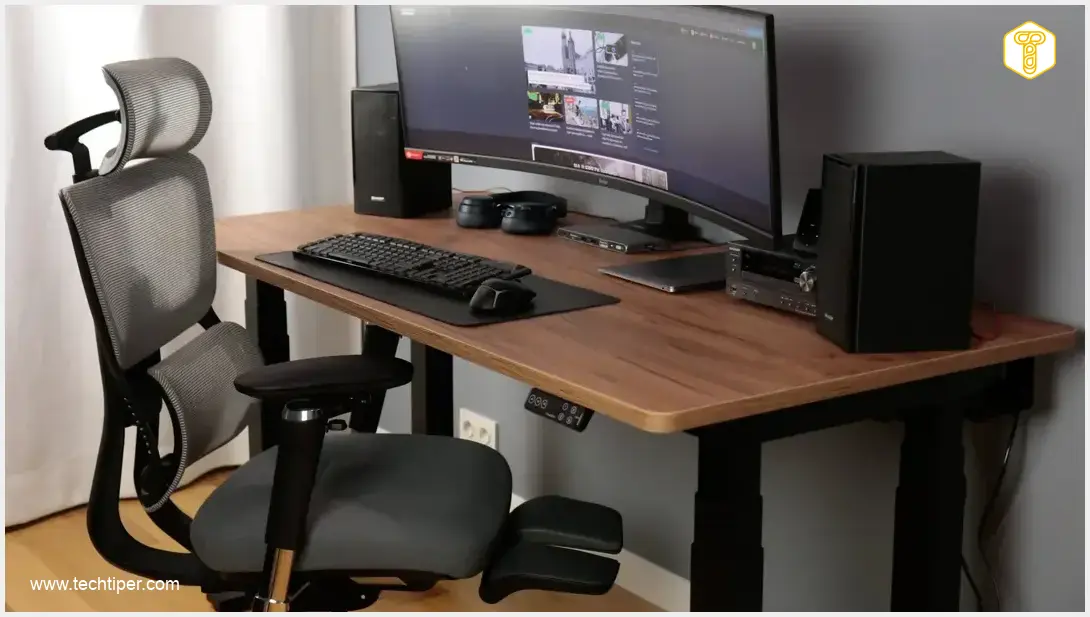
While many companies are encouraging a return to the office, remote work and the home office concept are undeniably here to stay. This makes investing in a comfortable and ergonomic workspace more crucial than ever. A poorly set up workstation can lead to discomfort, reduced productivity, and even long-term health issues, regardless of how much you enjoy your tasks. This is why I eagerly accepted the opportunity to review a comprehensive setup from FlexiSpot, including an advanced office chair, a versatile standing desk, and essential accessories designed to optimize any home office.
Building Your Ergonomic Home Office Setup
For years, I’ve explored various ways to optimize a workspace, from minor tweaks to complete overhauls. Now, I’m excited to showcase a foundational setup that proves you don’t need to spend a fortune to achieve an ergonomic and comfortable home office. FlexiSpot offers a wide range of products designed to significantly enhance your work comfort without compromising on quality or functionality.
In this review, I’ll detail the assembly process and user experience of the following FlexiSpot setup:
- FlexiSpot C7 Max Office Chair with Footrest: Designed for all-day comfort and support.
- FlexiSpot E7 Plus Electric Standing Desk (4-leg) with a Rattan Brown Desktop: A stable and versatile workstation (160×80 cm / 63×31.5 inches).
- Heavy-Duty Monitor Arm: To free up desk space and improve display ergonomics.
- Cable Organizer: For a neat and clutter-free workspace.
While specific pricing can vary by region and ongoing promotions, this comprehensive bundle typically offers excellent value for money, making an ergonomic setup accessible without breaking the bank. Always check the manufacturer’s website for the latest deals and product variations to find the best fit for your needs.
FlexiSpot C7 Max Chair with Footrest: All-Day Comfort
Effortless Assembly
The FlexiSpot C7 Max office chair arrives in a substantial box, with all components meticulously packed and protected for transit. The included instruction manual, though primarily visual, features clear, intuitive diagrams that make assembly straightforward. You won’t need to hunt for tools either, as a complete set, including spare screws, is provided. Each part is clearly labeled, eliminating guesswork and ensuring a smooth build.
Assembly is a bottom-up process: attach the wheels to the base, then the gas lift. Next, assemble the seat with armrests and the mechanism responsible for all adjustments. Finally, add the backrest, footrest, and headrest. The entire process is surprisingly quick and can be completed by one person in about 10 minutes, even while simultaneously documenting the steps. The instructions are so clear, and the parts so well-designed, that incorrect assembly is almost impossible.
Unparalleled Adjustability
Upon completing the assembly, the sheer number of adjustment options on the FlexiSpot C7 Max is immediately apparent. It’s almost overwhelming at first, but each adjustment contributes significantly to personalized comfort and proper posture:
- Armrests: Feature two independent adjustment points, allowing for rotation and extension, in addition to standard height adjustment. This multi-directional movement ensures optimal support for your arms and shoulders.
- Headrest: Can be precisely adjusted for height, tilt angle, and forward/backward extension, cradling your neck and head in various positions.
- Backrest Recline: Reclines up to 136 degrees with a lock function, perfect for finding your ideal working, reclining, or resting angle.
- Seat Depth Adjustment: Allows you to slide the seat forward or backward to accommodate different thigh lengths, ensuring proper support behind your knees.
- Retractable Footrest: Initially, I considered this a minor feature, but it quickly became indispensable for extended periods of relaxation or focused work, helping to relieve pressure on your legs. It conveniently tucks away completely when not in use, maintaining the chair’s sleek profile.
Thoughtful Design and Premium Materials
Key design details further enhance the C7 Max’s ergonomic appeal and overall comfort:
- Split Backrest: The lumbar support section is uniquely designed to conform exceptionally well to the natural curve of the spine, providing crucial, dynamic support for long hours. This entire backrest is also independently height-adjustable, allowing you to position the lumbar support precisely where you need it most.
- Premium Materials: Unlike typical mesh chairs that can feel abrasive or lose tension over time, the C7 Max features a high-quality, breathable texture covered with a pleasant-to-the-touch fabric. This combination ensures airflow while offering a soft, durable surface. The seat itself is a well-cushioned pad, offering optimal firmness to prevent fatigue and discomfort during prolonged sitting.
FlexiSpot E7 Plus Desk: Stability and Simplicity
Customizable to Your Needs
Now, let’s turn our attention to the FlexiSpot E7 Plus standing desk, which offers extensive customization options to fit any workspace and aesthetic preference. You can choose from two main desktop types:

- Engineered Wood: Available in various sizes ranging from 120-200 cm x 80 cm (approx. 47-79 inches x 31.5 inches).
- Solid Wood: Available in sizes ranging from 140-200 cm x 80 cm (approx. 55-79 inches x 31.5 inches), offering a premium, natural feel.
Additionally, there are over 10 desktop color variations and two frame colors (white or black) to match any office aesthetic. My review unit featured a 160 cm (63-inch) wide engineered wood top in Rattan Brown, which offers a warm and inviting look.
Straightforward Assembly (with a Little Help)
The E7 Plus desk frame arrives in two separate boxes (left and right sides), with the desktop packaged individually. As with the chair, the instructions are exceptionally clear, and all necessary hardware is included. FlexiSpot has paid attention to detail, providing all the necessary washers and protective elements to ensure a clean, finished look and prevent any loose components.
While assembly is straightforward, I recommend having a second person assist, primarily due to the considerable weight of the entire structure (approximately 70 kg / 154 lbs). Maneuvering the large desktop alone can be challenging. The process begins with assembling the frame, which involves repeating similar steps in a mirrored fashion. It’s a satisfying process as all parts fit together perfectly. Once the frame is complete, it’s placed onto the desktop, which comes pre-drilled for most mounting points, eliminating any concern about misaligned screws. The final steps involve connecting the control unit, front panel, and all associated cabling. A quick cable tidy-up, a flip, and your desk is ready to use.
Robust Stability and Smart Features
Once set up, the E7 Plus desk’s exceptional stability is immediately apparent. Its substantial weight, combined with the four-leg design, prevents any wobbling or shaking, even at its highest setting. The desktop itself boasts gracefully rounded corners and a robust thickness (2.5 cm / 1 inch engineered wood), contributing to both its durability and aesthetic appeal. Adjustable feet on the frame ensure stability even on uneven floors, allowing you to level the desk perfectly.
The standout feature of the FlexiSpot E7 Plus is its smooth electric height adjustment. Via the intuitive control panel, the desk can be precisely positioned between 66 cm and 131 cm (approx. 26 to 51.5 inches), accommodating a wide range of user heights for both sitting and standing positions. This adjustment is fluid, reasonably fast (25 mm/s), and remarkably quiet – you can hear the motors, but they are far from distracting. The panel allows you to save up to four preferred height settings for quick and effortless transitions throughout your workday.
An added convenience is the integrated USB-C charging port (20W) discreetly hidden within the control panel, perfect for keeping your devices powered up. The desk’s impressive weight capacity – up to 250 kg (550 lbs) dynamically and 350 kg (770 lbs) statically – underscores its exceptional durability and the power of its dual electric motors. FlexiSpot backs the frame with a generous 10-year warranty and the desktop with a 2-year warranty, providing peace of mind.
Organizing Cables and Mounting Your Monitor
Acquiring a quality desk is often just the first step in optimizing your ergonomic setup. From my own experience, two accessories are almost essential for a truly functional and aesthetically pleasing workspace: a monitor arm and a cable organizer. A monitor arm frees up valuable desk space and allows for optimal screen positioning, while a cable organizer ensures a tidy and clutter-free environment, which is invaluable for focus and aesthetics. FlexiSpot offers a wide array of other accessories to further enhance your workspace.
Efficient Cable Management
The cable organizer, like the other FlexiSpot products, comes with all necessary mounting hardware and clear, simple instructions. Its main section screws securely to the underside of the desktop, onto which the spacious shelf then slides. Constructed from durable aluminum, it provides ample stability to manage a full complement of cables, including power strips and bulky adapters, which are often the heaviest components. This effectively hides unsightly wires, contributing to a cleaner, more professional look.
Versatile Monitor Mounting
The monitor arm offers versatile mounting options: either a robust clamp for the desk edge or a grommet mount for a pre-drilled hole in your desktop. FlexiSpot conveniently includes hardware for both methods in the box, along with rubber pads to protect your desk surface from scratches or indentations. Assembly is incredibly simple, involving attaching the arm segments, securing the VESA plate to the back of your monitor, and then sliding the monitor assembly onto the arm. The kit also includes two types of screws and washers to ensure compatibility with various monitor models and mounting patterns.
I put the FlexiSpot monitor arm to a significant test with a 45-inch curved monitor weighing over 11 kg (approximately 24 lbs). The arm handled this substantial load with ease, demonstrating its robust build quality. Its triple-point articulation (two independent joints plus a movable base) allows for smooth adjustments in height, tilt, swivel, and rotation, and it securely locks in any desired position. The integrated cable management channels on the arm also helped maintain a clean setup, keeping display cables neatly tucked away. For those looking to optimize their display setup further, consider exploring high-performance monitors like the Lenovo ThinkVision P40wd 40-inch Ultrawide Professional Monitor or the XPPen Artist Pro 27 Gen 2 Digital Art Display, which pair perfectly with such a sturdy monitor arm.
Frequently Asked Questions (FAQ)
An ergonomic home office setup significantly reduces physical strain, prevents discomfort and long-term health issues like back pain or carpal tunnel syndrome, and boosts productivity by allowing you to work more comfortably and for longer periods. It also contributes to a more professional and organized workspace.
Yes, the FlexiSpot E7 Plus is exceptionally robust. It can support up to 250 kg (550 lbs) dynamically and 350 kg (770 lbs) statically, making it suitable for multiple monitors, heavy equipment, and even creative workstations without compromising stability or motor performance.
FlexiSpot products are generally designed for straightforward assembly. They come with clear, visual instructions and all necessary tools and hardware. While the chair can typically be assembled by one person in about 10 minutes, due to the desk’s weight, it’s recommended to have two people for easier and safer assembly.
Absolutely. The E7 Plus desk offers extensive customization options, including various desktop materials (engineered wood, solid wood), multiple sizes, over 10 desktop color variations, and two frame colors (white or black). This allows you to tailor the desk to your specific needs and aesthetic preferences.
Source: Self-developed. Opening photo: Lukasz Pajak
About Post Author
