

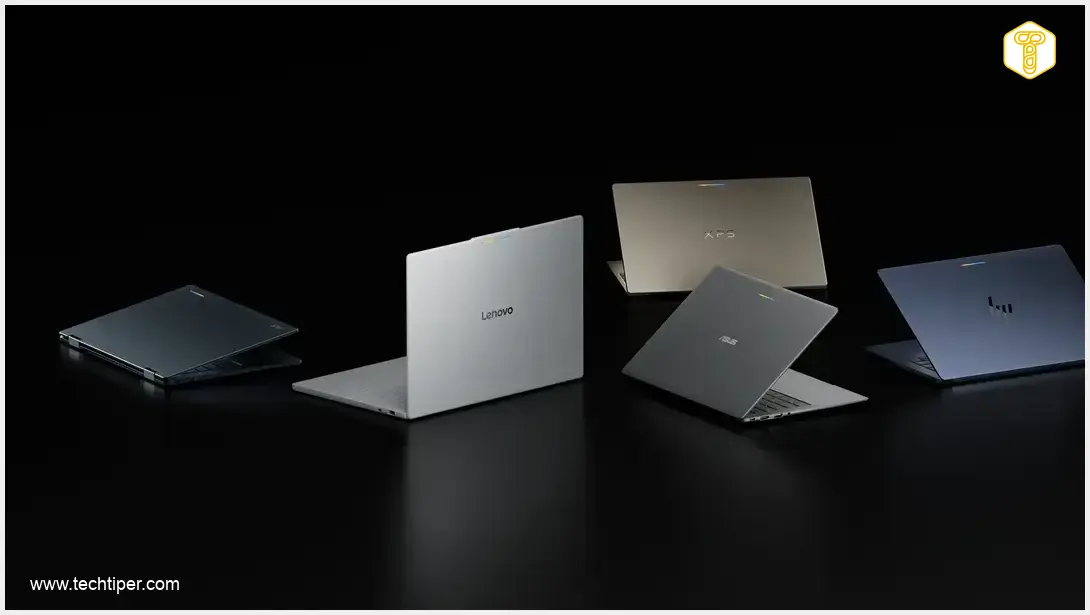
Googlebook marks a significant evolution in the laptop landscape, introducing a new premium family of devices developed in collaboration with Google’s hardware partners. These innovative laptops are meticulously designed to leverage the power of Android, ChromeOS, and the Gemini AI, promising a deeply integrated and long-lasting user experience. A standout commitment is the provision of ten years of software support, ensuring devices remain current and secure for a decade. Furthermore, Googlebook emphasizes tight integration with Android smartphones, enabling users to seamlessly transfer tasks between devices, access phone files directly from their laptop, and even run mobile applications on the larger computer screen.
Contents
Googlebook: A New Vision for Android-Powered Laptops
The Googlebook is not merely an incremental update to the existing Chromebook line; it signifies the launch of an entirely new category of notebooks. Google’s ambitious vision for Googlebook merges the established strengths of ChromeOS with a foundational Android core. This combination is further enhanced by an interface inspired by Material 3 Expressive design principles and full access to the vast ecosystem of the Google Play Store. The overarching goal is to deliver a computing experience for Android phone users that feels as cohesive and integrated as the experience MacBook offers to iPhone owners.
Practically, the new system retains familiar Chromebook characteristics such as simplicity, robust security, and deep integration with Google services. However, it significantly expands these capabilities by allowing Android applications to run natively on the laptop. This means users gain access to a broad spectrum of mobile tools, games, and streaming services, including the convenience of downloading Netflix content for offline viewing.
Seamless Smartphone Integration: Your Android Phone, Now Part of Your Laptop
The cornerstone of the Googlebook experience is its profound integration with Android smartphones. This synergy is brought to life through several innovative features:
- Continue On: This key feature allows users to initiate an activity or application on their smartphone and seamlessly transfer and continue that task on their Googlebook. The laptop also displays phone notifications, enables direct responses to messages, and synchronizes their status across both devices, ensuring a continuous workflow.
- App Cast: With App Cast, users can launch a selected phone application directly from a dedicated panel on their Googlebook. The app’s interface then appears in a window on the laptop’s display. Crucially, the application itself continues to run on the smartphone. While not a full emulator or traditional screen mirroring, this solution provides a convenient way to quickly access and interact with mobile services without needing to physically pick up the phone.
- Integrated File Access: The Googlebook is designed to present the storage of a paired smartphone within its file manager, much like an external drive connected to the computer. This functionality allows users to effortlessly browse, open, copy, and edit photos or documents stored on their phone without the need for cumbersome transfers via email or cloud services like Google Drive.
The Android 17 Requirement and Application Ecosystem Challenges
Many of the Googlebook’s most advanced cross-device collaboration features—such as Continue On, App Cast, and direct phone file access—will require a smartphone running Android 17. This presents a notable initial limitation, as rapid operating system updates typically roll out first to Google Pixel devices, followed by select flagship models from Samsung and other manufacturers. This staggered rollout means many users might not immediately benefit from the full suite of Googlebook features until their phone receives the necessary update.
Google has also indicated that applications in the Play Store will be labeled to indicate whether they have been optimized for large-screen experiences or if users should opt for their browser-based versions. This is a critical distinction, as some applications may operate in vertical windows akin to smartphones, others will adapt and stretch to a desktop-friendly format, and certain services will remain best accessed via their classic web versions.
However, a significant hurdle for the new platform remains in the professional software arena. While Googlebooks offer Android applications, a desktop-grade Chrome browser, and selected third-party tools, they initially lack many full-featured programs prevalent on Windows and macOS. This includes desktop versions of industry standards like Adobe Photoshop and Lightroom. In a price segment competitive with devices like the MacBook Air and premium Windows 11 laptops, this limitation could be a considerable drawback for some professional users.
Initial Lineup: Five Models to Kickstart the Googlebook Era
To launch this new computing platform, five prominent hardware partners have committed to releasing initial Googlebook models:
- Acer Googlebook 14: This is the only 2-in-1 convertible model in the initial lineup, featuring a rotatable touchscreen. It boasts a 14-inch 2.8K OLED display, an Intel Core Ultra 5 or Ultra 7 processor, up to 16 GB of RAM, and an impressive battery life of up to 16 hours. Pricing for this model begins at approximately $899 (around €830 / £710).
- ASUS Googlebook 14: Designed for portability, the ASUS model weighs approximately 1 kg (2.2 lbs). It comes with a 3K OLED touchscreen, up to 32 GB of RAM, and a comprehensive selection of ports including two USB-C, two USB-A, and an HDMI output. The starting price for this model is around $1299 (approximately €1200 / £1030). For more on ASUS’s innovations, check out their new AI laptops.
- Dell XPS Googlebook: Dell’s offering emphasizes a sleek design, featuring a remarkably thin chassis at just 12.7 mm (0.5 inches). It is powered by a Qualcomm Snapdragon X Elite processor but offers a minimalist port selection with only two USB-C connectors. The base configuration for this model is priced at approximately $1199 (around €1110 / £950).
- HP Googlebook 14: This model provides a 2.8K OLED display and is also equipped with the Snapdragon X Elite processor. It offers up to 1 TB of storage and includes both facial recognition and a fingerprint reader for convenient biometric login. The starting price for the HP Googlebook 14 is approximately $1299 (around €1200 / £1030).
- Lenovo Googlebook 15: Featuring a larger 15.3-inch OLED display, the Lenovo model stands out with the most versatile port selection among the launch devices, including HDMI, USB-A, and USB-C. Its base configuration is priced at approximately $1099 (around €1020 / £870).
(Note: All currency conversions to EUR and GBP are approximate based on recent exchange rates and for illustrative purposes only.)

Gemini: The Intelligence at the Core of the System
Google is heavily emphasizing the integral role of Gemini artificial intelligence within the Googlebook ecosystem. Among the highlighted AI-powered tools are:
- Magic Pointer: This feature leverages Gemini’s capabilities to offer contextual assistance and information relevant to the content currently displayed on the screen.
- Create My Widget: Users can generate custom widgets simply by describing their desired functionality, allowing for highly personalized and efficient workflows.
Every Googlebook launched in the initial wave will come with a 12-month subscription to the Google AI Pro package, which includes 5 TB of cloud storage and access to advanced Gemini features, including the autonomous Gemini Spark agent. Customers will also receive three-month trial periods for YouTube Premium, Adobe Photoshop, and CapCut, designed to enhance the appeal and utility of the devices during their first year of use.
Google has committed to an impressive up to 10 years of system updates, underscoring its long-term support for the Googlebook platform. The company also highlights robust security measures based on technologies developed for ChromeOS, including the hardware-based Google Titan root of trust and advanced local mechanisms for malware protection.
Availability and Pricing
Google commenced pre-orders for the first Googlebook models on September 21, 2026. Retail sales are scheduled to begin on October 4 in the United States, followed by October 5 in Canada, the United Kingdom, Ireland, France, Germany, and Australia. Google has yet to announce a timeline for expanding availability to additional markets.
Frequently Asked Questions (FAQ)
A Googlebook is a new premium laptop category that integrates elements of ChromeOS with a fundamental Android operating system and the Gemini AI. Unlike traditional Chromebooks, Googlebooks offer full access to the Google Play Store and native Android app support, along with deep smartphone integration features like task hand-off and direct file access, aiming to provide a seamless ecosystem similar to Apple’s macOS and iOS.
The most advanced features for seamless cross-device collaboration, including “Continue On” for task hand-off, “App Cast” for running phone apps on your laptop screen, and direct access to your phone’s files from the Googlebook’s file manager, will specifically require an Android smartphone running Android 17. Without this OS version, these particular functionalities may not be available.
Google has committed to an impressive up to 10 years of system updates for Googlebook devices. This ensures long-term security and feature enhancements. While Googlebooks support native Android apps and desktop Chrome, they currently lack desktop-grade professional software like Adobe Photoshop and Lightroom. Google is working to optimize Play Store apps for larger screens and offers trials for creative tools, but users needing robust desktop-specific professional applications should consider this limitation.
Opening photo: Google / Press Materials.
About Post Author
